
훌륭한 개발자가 되기 위하여
Paging 검색 기능에 Debounce를 적용하여 성능 개선하기 본문
초기 설계 방식
대용량 운동 데이터를 서버 API를 통해 받아와 사용자에게 보여주는 기능을 구현했다.
서버에서 운동 데이터를 Paging 방식으로 받아온 뒤, Jetpack Compose의 LazyColumn에 PagingData를 바인딩하여 출력하도록 구성하였다.
val pagingExercises: Flow<PagingData<ExerciseModel>> =
        getPagedExercisesUseCase(10).map { pagingData -> pagingData.map { it.toPresentation() } }
            .cachedIn(viewModelScope)
위 구조는 단순히 운동 목록을 조회하는 목적에는 문제가 없었지만, 데이터 양이 많아질수록 사용자가 원하는 운동을 찾기 어렵다는 한계가 있었다. 이에 따라 검색 기능과 필터링 기능의 필요성을 느끼게 되었다.
검색 & 필터링 기능 추가
검색 기능을 위해 다음과 같이 UI를 구현했다.
- SearchBar를 통해 사용자의 검색어(query)를 문자열로 입력받음
- Chip UI를 통해 신체 부위(bodyPart)를 선택
- 각 신체 부위는 enum class로 정의하여 클릭 시 상태가 업데이트되도록 두현
이후, 검색어와 신체 부위 값을 API에 전달하여 서버에서 필터링된 운동 데이터를 Paging으로 받아오도록 설계했다.
💥문제점 발견
기능적으로는 의도한 대로 동작했지만, 구현 이후 한 가지 큰 문제점을 발견했다.
👉 SearchBar에 글자를 입력할 때마다 API 호출이 발생한다는 점이었다.
🔧빠르게 입력할 경우 짧은 시간에 여러 번의 네트워크 요청이 발생하여 네트워크 낭비 + 성능 저하가 발생하였다.
Debounce란?
이 문제를 해결하기 위해 알게 된 개념이 Debounce였다.
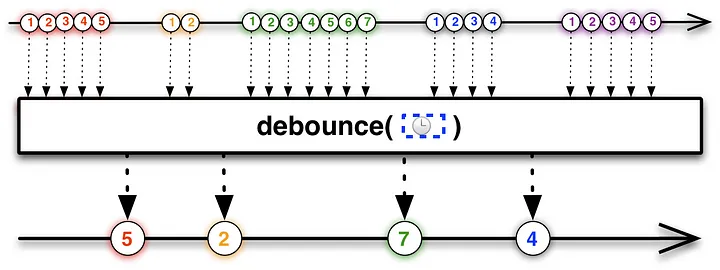
❓Debounce
👉 짧은 시간 동안 연속으로 발생하는 이벤트를 묶어서, 마지막 이벤트만 처리하도록 하는 연산자이다.
- 이벤트가 발생한 후 일정 시간이 지나기 전에 다시 이벤트가 발생하면 타이머를 리셋
- 최종적으로 일정 시간 동안 이벤트가 발생하지 않았을 때 한 번만 실행된다.
- 즉, 이벤트를 그룹핑하여 일정 시간동안 이벤트가 추가로 갱신되지 않으면 서버에 전송한다.
- Ex) 검색 입력 시 실시간 자동완성
Debounce의 내부 구조
@FlowPreview
public fun <T> Flow<T>.debounce(timeoutMillis: Long): Flow<T> {
    require(timeoutMillis >= 0L) { "Debounce timeout should not be negative" }
    if (timeoutMillis == 0L) return this
    return debounceInternal { timeoutMillis }
}- timeoutMillis가 음수인지 먼저 검사 (유효성 검사)
- timeoutMillis가 0이면 debounce 의미가 없으므로 그대로 반환
private fun <T> Flow<T>.debounceInternal(timeoutMillisSelector: (T) -> Long): Flow<T> =
    scopedFlow { downstream ->
        // Produce the values using the default (rendezvous) channel
        val values = produce {
            collect { value -> send(value ?: NULL) }
        }
        // Now consume the values
        var lastValue: Any? = null
        while (lastValue !== DONE) {
            var timeoutMillis = 0L // will be always computed when lastValue != null
            // Compute timeout for this value
            if (lastValue != null) {
                timeoutMillis = timeoutMillisSelector(NULL.unbox(lastValue))
                require(timeoutMillis >= 0L) { "Debounce timeout should not be negative" }
                if (timeoutMillis == 0L) {
                    downstream.emit(NULL.unbox(lastValue))
                    lastValue = null // Consume the value
                }
            }
            // assert invariant: lastValue != null implies timeoutMillis > 0
            assert { lastValue == null || timeoutMillis > 0 }
            // wait for the next value with timeout
            select<Unit> {
                // Set timeout when lastValue exists and is not consumed yet
                if (lastValue != null) {
                    onTimeout(timeoutMillis) {
                        downstream.emit(NULL.unbox(lastValue))
                        lastValue = null // Consume the value
                    }
                }
                values.onReceiveCatching { value ->
                    value
                        .onSuccess { lastValue = it }
                        .onFailure {
                            it?.let { throw it }
                            // If closed normally, emit the latest value
                            if (lastValue != null) downstream.emit(NULL.unbox(lastValue))
                            lastValue = DONE
                        }
                }
            }
        }
}- produce : Flow ➡️ Channel로 변환
- Channel로 변환하는 이유 : select는 Channel 이벤트만 대기 가능하고 flow는 select 대상이 될 수 없기 때문이다.
- lastValue : 아직 emit되지 않은 가장 최신 값
- timeout이 0이면 debounce 비활성화 ➡️ 즉시 emit
- onTimeout : 지정한 시간 동안 아무 이벤트도 발생하지 않으면 내부 블록 실행
- onReceiveCatching : 새로운 값이 들어오면 이전 값은 버리고 lastValue만 갱신
- 이 시점에서 타이머는 자동 리셋
예시 코드
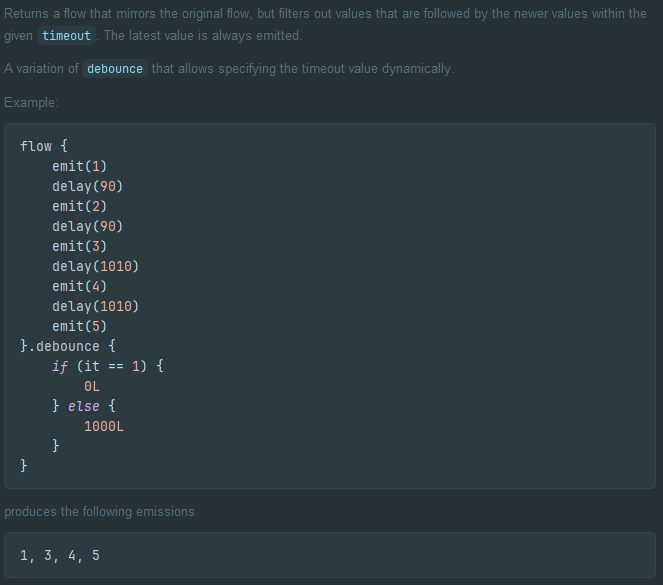
개선된 구조
private fun getPagedExercises(): Flow<PagingData<ExerciseModel>> {
    return _directoryUIState
        .map { it.query to it.bodyPart?.apiValue }
        .debounce(300)
        .distinctUntilChanged()
        .flatMapLatest { (query, bodyPart) ->
            if (bodyPart == BodyPartModel.BOOKMARK.apiValue) {
                _directoryUIState
                    .map { state ->
                        PagingData.from(
                            state.bookmarkExercises
                                .filter { it.name.contains(query ?: "", ignoreCase = true) }
                        )
                    }
            } else {
                getPagedExercisesUseCase(30, query, bodyPart)
                    .map { pagingData ->
                        pagingData.map { it.toPresentation() }
                    }
            }
        }
        .cachedIn(viewModelScope)
}- distinctUntilChanged()는 이전 값과 동일한 값인 들어오면 Flow를 emit 하지 않는다.
- flapMapLatest는 새로운 값이 들어오면 이전 작업을 즉시 취소하고 최신 작업만 유지한다.
Throttle

❓Throttle이란?
👉 일정 시간 간격으로 이벤트를 실행하는 연산자
- 이벤트가 아무리 많이 발생해도 지정된 시간 동안 단 한 번만 실행
- 일정 주기마다 작업을 실행하고 싶을 때 사용
- Ex) 버튼 중복 클릭 방지
Sample
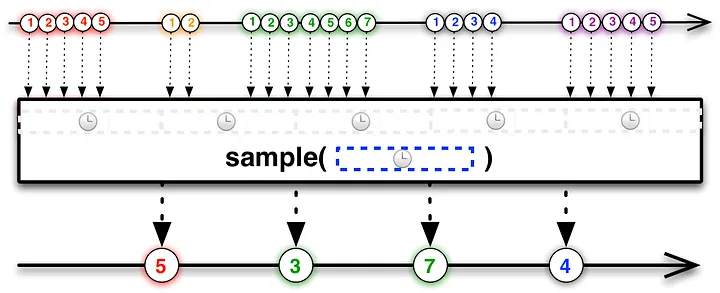
❓Sample이란?
👉 throttle 기법 중 throttleLast이며 일정하게 도는 타이머가 종료될 때 발생하는 이벤트 중 마지막 이벤트 처리
Sample의 내부 구조
@FlowPreview
public fun <T> Flow<T>.sample(periodMillis: Long): Flow<T> {
    require(periodMillis > 0) { "Sample period should be positive" }
    return scopedFlow { downstream ->
        val values = produce(capacity = Channel.CONFLATED) {
            collect { value -> send(value ?: NULL) }
        }
        var lastValue: Any? = null
        val ticker = fixedPeriodTicker(periodMillis)
        while (lastValue !== DONE) {
            select<Unit> {
                values.onReceiveCatching { result ->
                    result
                        .onSuccess { lastValue = it }
                        .onFailure {
                            it?.let { throw it }
                            ticker.cancel(ChildCancelledException())
                            lastValue = DONE
                        }
                }

                // todo: shall be start sampling only when an element arrives or sample aways as here?
                ticker.onReceive {
                    val value = lastValue ?: return@onReceive
                    lastValue = null // Consume the value
                    downstream.emit(NULL.unbox(value))
                }
            }
        }
    }
}
예시 코드

'안드로이드' 카테고리의 다른 글
| Jetpack Compose로 ViewModel 공유하기 (0) | 2025.11.13 |
|---|---|
| Jetpack Compose로 Custom Calendar 구현하기 (0) | 2025.10.26 |
| Jetpack Compose에서 Paging3로 대용량 데이터 처리하기 (0) | 2025.09.18 |
| [JetpackCompose] Compose Side Effect (0) | 2025.08.14 |
| [Jetpack Compose] State Hoisting이란? (0) | 2025.08.09 |

